Abstract
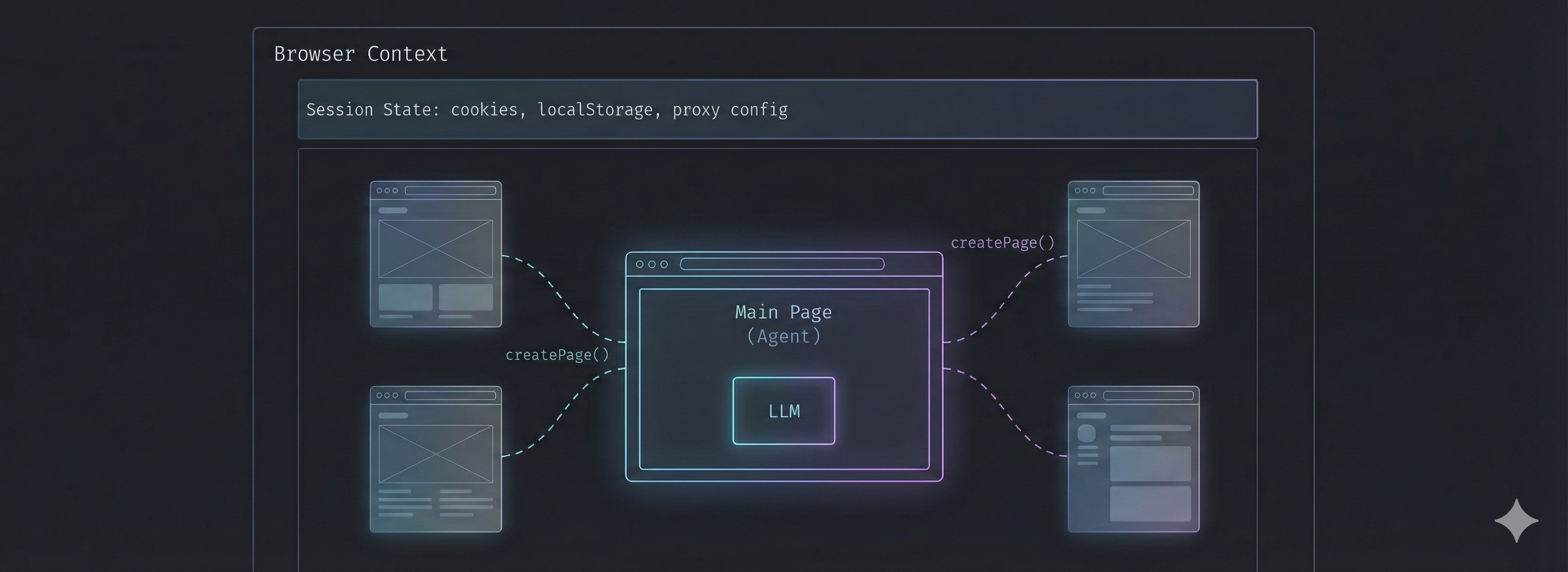
Contemporary browser automation agents operate under a fundamental constraint: single-page state binding. This limitation creates friction in real-world workflows that inherently require multi-context operations—email verification flows, OAuth handshakes, cross-domain data aggregation, and popup-based interactions. This document presents a minimal architectural extension that enables custom tools to spawn isolated pages within a shared browser session, transforming tools from pure compute operations into autonomous micro-agents capable of independent browser manipulation.
1. Problem Statement
1.1 The Single-Context Assumption
Modern LLM-powered browser agents are architected around an implicit assumption:
"The agent has one environment window. Tool calls are stateless compute operations."
This assumption manifests in several ways:
- Tools receive parameters and return results without environment access
- The agent's "world state" is limited to a single page
- Navigation to a new URL overwrites the current context entirely
- No mechanism exists for parallel or branched browser operations
1.2 Real-World Workflow Patterns
Production automation workflows frequently exhibit patterns that violate single-context assumptions:
| Pattern | Description | Failure Mode |
|---|---|---|
| Email Verification | Activation links must be followed without disrupting main flow | Loses form state when navigating to link |
| OAuth/SSO Flows | Authentication opens in popup or redirect | Cannot return to original page with tokens |
| Cross-Domain Lookup | Data required from Site B during Site A workflow | Must complete Site A before fetching from B |
| Popup Interactions | Site spawns modal windows for actions | Agent cannot interact with secondary windows |
| Parallel Verification | Multiple URLs need simultaneous validation | Sequential processing with state loss |
1.3 Current Workarounds and Their Limitations
1. Multiple Agent Instances
Separate processes with isolated browsers
- ❌ No session sharing (cookies, storage, proxy config)
- ❌ Coordination overhead between processes
- ❌ Resource multiplication
2. State Serialization
Save/restore page state around navigations
- ❌ Incomplete state capture (WebSocket connections, timers)
- ❌ Race conditions in dynamic applications
- ❌ Implementation complexity
3. Deferred Execution
Queue secondary operations for later
- ❌ Breaks time-sensitive flows (OTP expiration)
- ❌ Cannot handle blocking dependencies
2. Solution: Context-Aware Tool Execution
2.1 Core Primitive
The solution introduces a single capability to the tool execution context:
interface ToolExecutionContext {
  /** The primary page under agent control */
  page?: Page;

  /** The browser context containing session state */
  browserContext?: BrowserContext;

  /** Factory for creating session-aware isolated pages */
  createPage?: () => Promise<Page>;
}
The createPage() function is the key primitive. It:
- Creates a new page within the existing browser context
- Inherits all session state (cookies, localStorage, proxy configuration)
- Applies anti-detection scripts automatically
- Tracks created pages for cleanup on errors
2.2 Architectural Implications
This seemingly simple addition fundamentally changes the tool-agent relationship:
Before
Tools are functions
f(params) → result
After
Tools are micro-agents
f(params, environment) → result
Tools can now:
- Navigate independently without affecting the main agent
- Perform multi-step browser operations
- Spawn their own sub-agents for complex tasks
- Execute in parallel across multiple pages
3. Implementation Patterns
3.1 Pattern: Isolated Page Operations
The simplest pattern—perform an operation on a separate page without affecting the main workflow.
class EmailActivationTool implements ComputerUseTool {
  name = "activate_email_link";

  async call(
    params: Record<string, unknown>,
    ctx?: ToolExecutionContext
  ): Promise<ToolResult> {
    const { url, successIndicator } = params;

    if (!ctx?.createPage) {
      return { error: "Browser context not available" };
    }

    const page = await ctx.createPage();

    try {
      const response = await page.goto(url, { waitUntil: "networkidle" });
      const status = response?.status() ?? 0;
      const content = await page.content();

      const success = successIndicator
        ? content.includes(successIndicator)
        : status >= 200 && status < 400;

      return {
        output: JSON.stringify({
          success,
          finalUrl: page.url(),
          status,
          title: await page.title(),
        }),
      };
    } finally {
      await page.close();
    }
  }
}
Key characteristics:
- Main agent page remains untouched
- Session cookies are shared (important for authenticated activation links)
- Page is always closed in
finallyblock - Structured result enables downstream decision-making
3.2 Pattern: Cross-Domain Data Aggregation
Fetch data from external sources during a workflow without losing context.
class CrossDomainLookupTool implements ComputerUseTool {
  name = "lookup_external_data";

  private readonly endpoints = {
    portal_a: {
      url: "https://portal-a.example.com/lookup?id=",
      selector: "[data-field='result']",
    },
    portal_b: {
      url: "https://portal-b.example.com/search/",
      selector: ".search-result-value",
    },
  };

  async call(params, ctx?: ToolExecutionContext): Promise<ToolResult> {
    const { identifier, source } = params;
    const endpoint = this.endpoints[source];
    const page = await ctx.createPage();

    try {
      await page.goto(`${endpoint.url}${encodeURIComponent(identifier)}`);
      await page.waitForSelector(endpoint.selector, { timeout: 10000 });
      const value = await page.locator(endpoint.selector).first().innerText();

      return {
        output: JSON.stringify({ source, identifier, value: value.trim() }),
      };
    } finally {
      await page.close();
    }
  }
}
Use case: An agent filling out a form on Site A needs a registration number from Site B. The tool fetches it without the agent ever leaving Site A.
3.3 Pattern: Sub-Agent Delegation
The most powerful pattern—spawn a complete sub-agent to handle complex subtasks.
class DelegatedExtractionTool implements ComputerUseTool {
  name = "delegate_extraction";

  async call(params, ctx?: ToolExecutionContext): Promise<ToolResult> {
    const { task, targetUrl } = params;
    const page = await ctx.createPage();

    try {
      await page.goto(targetUrl, { waitUntil: "networkidle" });

      const subAgent = new ComputerUseAgent({
        apiKey: this.apiKey,
        page,
        executionConfig: {
          typing: { mode: "fill" },
          screenshot: { delay: 0.1 },
        },
      });

      const result = await subAgent.execute(task, ExtractedDataSchema, {
        maxTokens: 2048,
        onlyNMostRecentImages: 3,
      });

      return { output: JSON.stringify(result) };
    } finally {
      await page.close();
    }
  }
}
Architectural significance:
- A coordinator agent manages high-level workflow
- Specialized sub-agents handle domain-specific tasks
- Each sub-agent operates in an isolated context
- All agents share session state for authenticated workflows
3.4 Pattern: Parallel Page Operations
Execute multiple browser operations concurrently.
class ParallelAvailabilityTool implements ComputerUseTool {
  name = "check_urls_parallel";

  async call(params, ctx?: ToolExecutionContext): Promise<ToolResult> {
    const { urls, timeout } = params;

    const checkUrl = async (url: string): Promise<PageCheckResult> => {
      const page = await ctx.createPage();
      const start = Date.now();

      try {
        const response = await page.goto(url, {
          waitUntil: "domcontentloaded",
          timeout,
        });

        return {
          url,
          status: response?.status() ?? 0,
          title: await page.title(),
          loadTime: Date.now() - start,
        };
      } finally {
        await page.close();
      }
    };

    const results = await Promise.all(urls.map(checkUrl));

    return {
      output: JSON.stringify({
        checked: results.length,
        successful: results.filter((r) => r.status >= 200 && r.status < 400).length,
        results,
      }),
    };
  }
}
Performance: N pages checked in ~1x time vs Nx time sequentially, bounded by browser context resource limits.
4. Architectural Analysis
4.1 Session Continuity Model
All pages created via createPage() share:
| Resource | Shared | Implications |
|---|---|---|
| Cookies | ✓ | Authentication persists across pages |
| localStorage | ✓ | Application state accessible |
| sessionStorage | ✗ | Per-page isolation maintained |
| Proxy Configuration | ✓ | IP consistency for bot detection |
| Anti-Detection Scripts | ✓ | Consistent fingerprint |
| WebSocket Connections | ✗ | Must establish per-page |
4.2 Comparison with Alternative Architectures
| Approach | Session Sharing | Resource Efficiency | Coordination |
|---|---|---|---|
| Single Context (baseline) | N/A | High | N/A |
| Multi-Process Agents | None | Low | High |
| Browser Context per Tool | Partial | Medium | Medium |
| Shared Context + createPage() | Full | High | Low |
5. Use Cases
5.1 Insurance Claims Processing
Agent Workflow:
1. Navigate to claims portal
2. Fill claim form with policyholder data
3. [Tool] Verify coverage in separate underwriting system
4. [Tool] Fetch accident report from government database
5. Upload supporting documents
6. [Tool] Activate email confirmation link
7. Return confirmation number
Without multi-context: Steps 3, 4, 6 would each destroy the form state.
5.2 E-Commerce Order Management
Agent Workflow:
1. Log into merchant dashboard
2. For each pending order:
   a. [Tool] Check inventory in warehouse system
   b. [Tool] Verify shipping address via postal API
   c. [Tool] Compare competitor pricing (parallel, 5 sites)
   d. Update order status
3. Generate summary report
Parallel competitor checks complete in ~1x time instead of 5x.
5.3 Compliance Verification
Agent Workflow:
1. Open regulatory submission form
2. [Tool] Sub-agent extracts data from uploaded PDF (new page)
3. [Tool] Cross-reference entity in multiple government registries (parallel)
4. [Tool] Verify signatory authorization in corporate registry
5. Complete and submit form
Each verification maintains session context for authenticated registries.
6. Implications for Agent Architecture
6.1 Toward Distributed Intelligence
This primitive enables a shift from monolithic to distributed agent architectures:
6.2 Emergent Capabilities
| Capability | Enabled By |
|---|---|
| Task Decomposition | Sub-agents handle subtasks independently |
| Parallel Execution | Multiple pages operate concurrently |
| Failure Isolation | Tool page crash doesn't affect main agent |
| Specialization | Different sub-agents optimized for different domains |
| State Preservation | Main workflow state maintained through branches |
6.3 Design Principles
- Tools as Capability Boundaries: Tools define what additional browser access an agent can request
- Explicit Page Lifecycle: Tools must manage page creation and cleanup
- Session as Shared Resource: Authentication is ambient, not passed explicitly
- Structured Results: Tool outputs should enable downstream reasoning
7. Limitations and Future Work
7.1 Current Limitations
- No Cross-Page Communication: Pages cannot directly share runtime state
- Sequential Sub-Agent Execution: Sub-agents run one at a time per tool call
- Memory Overhead: Each page consumes browser resources
- No Page Persistence: Tool pages exist only for the duration of the tool call
7.2 Future Directions
- Page Pooling: Reusable pre-warmed pages for frequent operations
- Inter-Page Messaging: Event-based communication between pages
- Persistent Tool Pages: Long-lived pages for stateful tools
- Resource Quotas: Limits on concurrent pages per agent
- Distributed Contexts: Browser contexts across multiple machines
8. Conclusion
Multi-context browser control addresses a fundamental limitation in agentic browser automation. By enabling tools to spawn isolated pages within a shared session, the architecture transforms tools from pure functions into autonomous micro-agents capable of independent browser manipulation.
This primitive—a single createPage() function—unlocks:
- Non-destructive auxiliary operations (email verification, OAuth)
- Cross-domain data aggregation during workflows
- Hierarchical agent architectures with sub-agent delegation
- Parallel browser operations for performance
The implications extend beyond implementation convenience. This capability enables distributed intelligence architectures where reasoning, environment manipulation, and verification can be separated across specialized agents while maintaining session continuity.
As browser automation agents take on increasingly complex workflows, multi-context control becomes not an optimization but a necessity.
Use This in Your Projects
These multi-context capabilities are available in our open-source BrowserAgent package. Build custom tools with createPage(), access browserContext, and create hierarchical agent architectures today.